
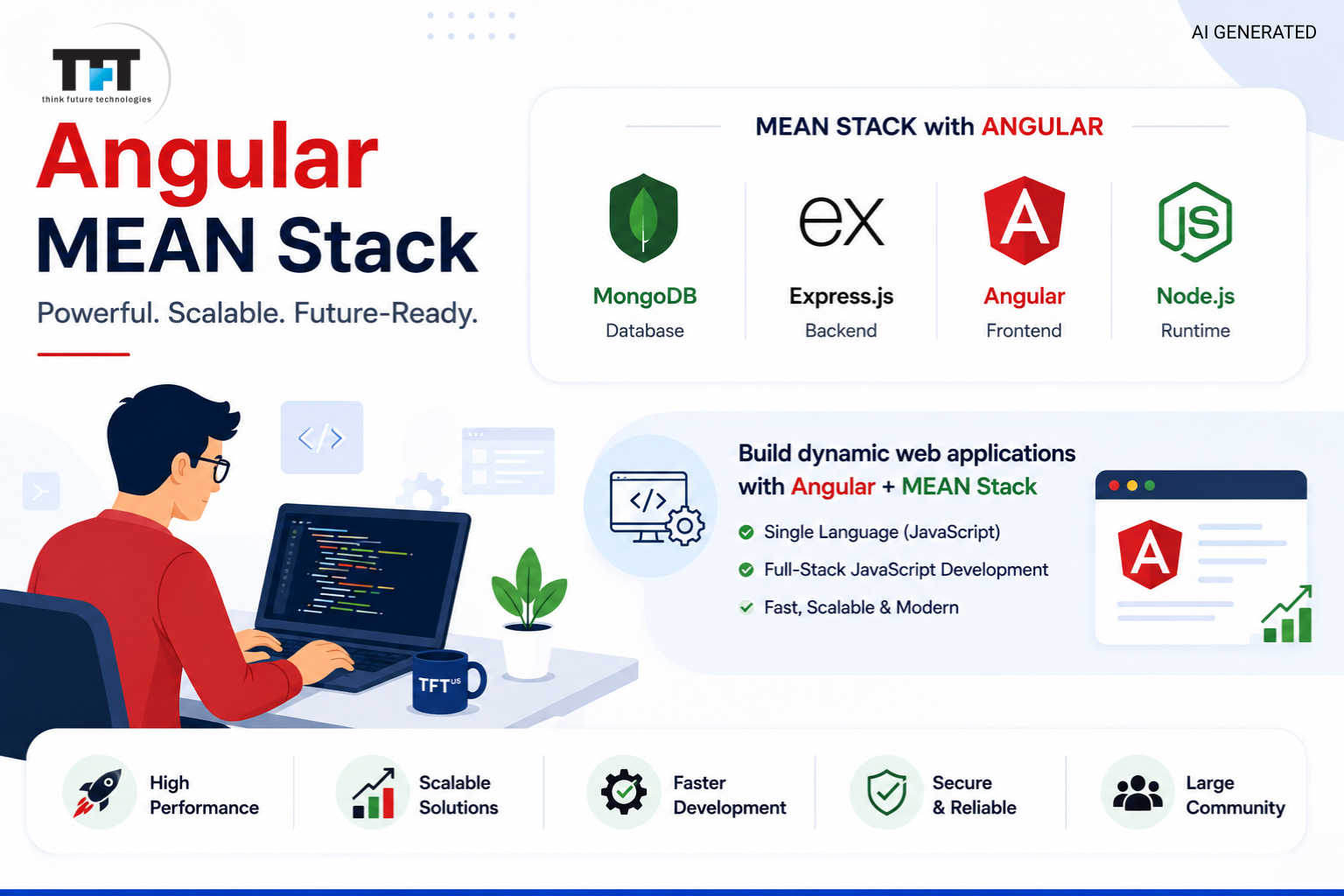
The MEAN stack remains one of the most popular technology stack choices for teams building robust web applications entirely in JavaScript. Pairing Angular with MongoDB, Express.js, and Node.js gives full-stack developers a single language across the entire application, from the database to the front end.
This guide walks through what the MEAN stack actually is, how its four components work together, what you need to start building, and how to take a MEAN stack system from local development to production.
What Is MEAN Stack and Why Use Angular?
MEAN is a full-stack solution built from MongoDB, Express.js, Angular, and Node.js. Each piece handles a different layer of a complete web application: MongoDB stores data, Express.js and Node.js handle server-side logic, and Angular manages everything the user sees and interacts with. Because all four technologies run on JavaScript, a MEAN stack developer can move across the entire application without switching between different technologies or back-end languages.
Angular is chosen for the MEAN stack because it’s a complete, opinionated web application framework rather than a bare library. It ships with routing, forms handling, HTTP utilities, and dependency injection out of the box, which gives development teams a consistent structure for building large or long-lived applications. For teams that want built-in conventions rather than assembling their own toolchain, Angular is the natural front-end choice.
This combination has stayed popular precisely because it removes friction between layers. A single programming language means fewer context switches, shared validation logic between client and server, and a smaller learning curve for developers joining a project already in progress. It’s part of why the MEAN stack continues to show up in comparisons with the MERN stack as one of the two dominant JavaScript-based approaches to full stack applications.
A 2026 analysis by Learnomate notes that Angular’s opinionated architecture and enforced project structure can help development teams maintain consistency and collaboration across enterprise applications. This structured approach is one reason Angular remains attractive for larger, long-lived projects.
Core Components of the MEAN Stack
Understanding the MEAN Stack means understanding what each of its four technologies actually does, since together they form one continuous, JavaScript-based pipeline from database to browser.
MongoDB Database
MongoDB is a document-oriented database that stores data in JSON-like documents instead of rigid tables. This NoSQL database format maps naturally onto JavaScript objects, which is part of why it pairs so well with the rest of the MEAN stack. Flexible schemas make MongoDB well suited to applications where data structures evolve over time.
Express.js
Express.js is a lightweight web application framework that runs on Node.js and manages routing, middleware, and API endpoints. It’s the layer that receives requests from the Angular front end, processes them, and talks to the MongoDB database, forming the backbone of the stack’s server-side logic.
Angular
Angular is the open-source JavaScript framework responsible for building interactive user interfaces. It uses components, services, and modules to structure an application, along with the Angular CLI (command line interface) to scaffold new projects, generate components, and manage builds.
Node.js
Node.js is the JavaScript runtime environment that lets JavaScript code run outside the browser, powering the web server itself. Its asynchronous programming model makes it efficient at handling many simultaneous connections, which matters for dynamic web applications with real-time features. Because Node.js and Angular both run JavaScript, developers can reuse validation logic, utility functions, and even data models across the front end and back end of a MEAN stack system.
Prerequisites to Learn MEAN Stack Development
Before diving into MEAN stack development, a working knowledge of core JavaScript is essential, since the same language runs across every layer of the stack. Comfort with asynchronous programming, JSON-like data structures, and basic command-line usage will make the learning curve considerably smoother.
Beyond JavaScript itself, it helps to understand REST API concepts, since Express.js and Angular communicate primarily through HTTP requests. Familiarity with npm, the Node package manager, is also assumed, as it’s used to install everything from Angular CLI to backend libraries.
It’s also worth having at least a conceptual understanding of NoSQL databases before working with MongoDB, since document-oriented storage behaves differently from the relational, entire-table structure many developers learn first. None of these prerequisites require mastery upfront; most full-stack developers pick them up gradually while building their first MEAN stack project.
How Do I Set Up a MEAN Stack Development Environment?
Setting up a MEAN stack development environment starts with installing Node.js, which brings npm along with it. From there, most developers install the Angular CLI globally so they can scaffold new front-end projects directly from the command line interface.
Installing Angular CLI
Once Node.js is installed, running a single npm command installs the Angular CLI globally, making the ng command available anywhere on the system. The Angular CLI can then generate a new project, along with components, services, and modules, following Angular’s standard project structure.
Setting Up MongoDB
MongoDB can run locally or through a hosted, cloud-based service. Either way, developers typically create a database and matching collections to mirror the JSON-like documents their application will store, then connect to it from the Express.js backend using a driver library. Choosing between a local install and a managed, cloud-based database often comes down to how quickly a team wants to move; local setups are faster for experimentation, while cloud applications benefit from automatic backups and easier scaling later on.
Case Study: MongoDB’s Production-Ready MEAN Stack Tutorial
MongoDB created a complete MEAN Stack employee management application demonstrating MongoDB Atlas, Express.js REST APIs, Angular, and Node.js working together. The project uses GitHub Codespaces for zero-setup development and follows production-oriented practices such as database configuration, API implementation, Angular routing, and component-based architecture.
The example provides developers with a practical reference for understanding how the four MEAN components work together in a complete application rather than as isolated technologies.
How Do I Connect Angular Frontend to Node.js Express Backend?
Connecting the Angular front end to a Node.js Express backend usually comes down to Angular’s built-in HTTP client, which sends requests to Express.js routes exposed as a REST API. Express.js parses each request, applies any middleware such as validation or logging, and returns a JSON-like response Angular can consume directly.
Keeping the API layer and the Angular application separate, rather than tightly coupled, makes the stack easier to scale and easier to deploy independently. Many teams run the Angular app and the Express.js server as separate processes even in development, communicating purely over HTTP.
Good error handling matters on both sides of this connection. Express.js middleware typically catches failures before they reach the client, returning consistent, structured error responses, while Angular’s HTTP client can centralize how those errors are displayed to the user rather than handling them ad hoc in every component.
How Do I Implement Authentication in MEAN Stack with Angular?
Authentication in a MEAN stack system typically relies on token-based approaches, most commonly JSON Web Tokens issued by the Express.js backend after a successful login. Angular then stores that token and attaches it to future requests, often using an HTTP interceptor to handle this automatically.
On the backend, middleware checks incoming tokens before allowing access to protected Express.js routes, while MongoDB stores user credentials, ideally hashed rather than in plain text. Angular route guards complement this by preventing unauthenticated users from reaching protected views in the first place, giving the application coverage from database to front end.
Some teams go further and add end-to-end encryption for particularly sensitive data, layering it on top of standard token-based authentication. Whatever the specifics, the goal across a MEAN stack system is the same: verify identity once, then pass that verified state consistently through every layer of the application.
Building Full Stack Applications with the MEAN Stack
Because every layer of the MEAN stack speaks JavaScript, full stack developers can move between front-end and back-end work without switching languages or mental models. This single-language approach speeds up the development process for teams building everything from admin dashboards to consumer-facing single-page applications (SPAs).
Angular’s component-based structure encourages developers to break interfaces into small, reusable pieces, while Express.js keeps backend logic organized into clear, testable routes. Together, these patterns help teams create applications that stay maintainable as they grow, rather than turning into a single, tangled codebase.
Want to see these four technologies work together in practice? This 2026 course walks through MEAN Stack development with hands-on projects, giving you a practical view of how the architecture comes together.
MEAN Stack vs MERN Stack
The MEAN stack and the MERN stack share three of their four components: MongoDB, Express.js, and Node.js. The difference sits entirely in the front-end layer, where MEAN uses Angular’s complete web application framework, and MERN uses React, a smaller JavaScript library focused on building interactive user interfaces.
Choosing between them usually comes down to how much structure a team wants. Angular’s built-in tooling suits development teams that value consistency across a codebase, while React’s flexibility suits teams that prefer picking their own libraries for routing and state management.
How Do I Deploy a MEAN Stack Application to Production?
Deploying a MEAN stack application generally means building the Angular front end into static files, packaging the Express.js and Node.js backend separately, and pointing both at a production MongoDB instance, often hosted as a managed, cloud-based database. Many teams containerize each piece so the whole stack can be deployed consistently across environments.
Cloud applications built on the MEAN stack commonly run the Node.js server on a cloud platform’s application hosting service, serve the compiled Angular files through a CDN or static hosting layer, and rely on a managed MongoDB service for storage and backups. This separation lets each part of the stack scale independently as traffic grows.
Conclusion
The Angular mean stack works because every layer shares one language: Angular renders the interface, Express.js and Node.js handle the logic, and MongoDB stores the data, all in JavaScript. That consistency is what turns MongoDB, Express.js, Angular, and Node.js from four separate tools into a single, coherent full stack solution.
For teams that value Angular’s built-in structure — routing, forms, dependency injection — over a lighter, more flexible frontend like React, the MEAN stack remains a solid, production-ready choice. Whether you’re just becoming a MEAN stack developer or scaling an existing Angular application into a cloud application, the same four components carry the project from local development through to deployment.
Frequently Asked Questions
What is MEAN stack and why use Angular?
MEAN stack is a full stack solution built from MongoDB, Express.js, Angular, and Node.js. Angular is used because it's a complete web application framework with built-in routing, forms, and dependency injection, giving teams a consistent structure for building complex user interfaces.
What prerequisites do I need to learn MEAN stack development?
A solid grasp of JavaScript, including asynchronous programming and JSON-like data structures, is the main prerequisite. Basic familiarity with the command line interface, npm, and REST API concepts will also make the MEAN stack noticeably easier to pick up.
How do I set up a MEAN stack development environment?
Install Node.js first, since it brings npm with it, then install the Angular CLI globally to scaffold new front-end projects. From there, set up a local or cloud-based MongoDB instance and connect it to an Express.js backend to complete the environment.
How do I connect Angular frontend to Node.js Express backend?
Angular's built-in HTTP client sends requests to Express.js routes exposed as a REST API, and Express.js returns JSON-like responses that Angular consumes directly. Keeping the two layers loosely coupled, communicating only over HTTP, makes the stack easier to scale and deploy.
How do I implement authentication in the MEAN stack with Angular?
Most MEAN stack applications use token-based authentication, where Express.js issues a token after login and Angular attaches it to future requests via an HTTP interceptor. Backend middleware validates the token on protected routes, while Angular route guards restrict access on the front end.
How do I deploy a MEAN stack application to production?
Build the Angular app into static files, package the Express.js and Node.js backend separately, and connect both to a production, cloud-based MongoDB instance. Many teams containerize each piece so the full stack applications deploy consistently and can scale independently.
-
 jyoti mishra
 - 16 Sep 2026
Hire MEAN Stack Developer India: Expert Full-Stack Programmers for Your Project
Businesses building modern web applications need a technology stack that moves fast without breaking under real-world load. That is exactly…
-
jyoti mishra
- 08 Sep 2026
MEAN Stack Services: Full-Stack Development Solutions for Modern Applications
Businesses building web applications today need more than a website that loads fast; they need software that scales, integrates cleanly…
-
jyoti mishra
- 08 Sep 2026
MEAN Stack Development Services: Expert Full-Stack Solutions
For businesses building modern web applications, a scalable, agile tech stack is essential. MEAN stack development services address exactly that.…
-
jyoti mishra
- 08 Sep 2026
What Does a Freelance MEAN Stack Developer Mean? A Complete Guide
A freelance MEAN stack web developer is someone who will develop a full-stack web application, but they don't join your…
-
jyoti mishra
- 02 Sep 2026
Mean Stack Consulting Services: Expert Guidance for Your Development Projects
Choosing the right technology partner can make or break a web project. For companies weighing frameworks, budgets, and timelines, mean…
-
stephen massey
- 01 Sep 2026
How to Choose the Right Offshore Software Testing Company for Your Business
The average time for the US to fill a Senior Quality Assurance Automation Engineer position is approximately 11 to 14…

Leave a Reply